v2.1 — New Project Mode · Consensus Engine · Full i18n

The Ultimate AI Detective For Your Codebase

Surgical patching · 8 AI strategies · Autonomous improvement loops
Local-first Ollama · Consensus Engine · EN/RU i18n · Zero codebase exposure

⬇  Download v2.1 ⚙  Auto-Improve Pipeline ⭐  GitHub
8
AI Strategies
55+
Unit Tests
4
Consensus Modes
120k→4k
Token Compression
EN/RU
Full i18n
100%
Offline Capable
Sponsored

Core Capabilities

Everything you need.
Nothing you don't.

Modular architecture that adapts to your workflow — from offline hacking to fully autonomous improvement pipelines.

⚙️
Auto-Improve Pipeline
Configure a goal, choose scripts, pick an AI strategy. Sherlock runs your script, reads output, generates a patch, validates syntax, applies it, re-runs, and iterates — fully autonomously. Metric tracking, auto-rollback on regression, up to 999 iterations.
Autonomous8 StrategiesAuto-RollbackMetric Tracking
🕵️
Sherlock Mode
Automated root-cause analysis. Feed error logs, get a minimal patch targeting the actual cause — not the symptom. Confidence scoring and hypothesis chain included.
Root-Cause
🧠
Multi-Model Engine
Ollama offline, OpenAI-compatible APIs, ZennoPoster File Signal. Switch providers mid-session. Streaming and non-streaming. Groq, Together AI, LM Studio, Gemini, Mistral all work out of the box.
7+ Providers
Surgical Patching
SEARCH_BLOCK → REPLACE_BLOCK. Only the exact target block is touched. Empty SEARCH_BLOCK creates new files automatically. Ambiguous multi-match rejected. Syntax-check before write.
Exact MatchNew Files
🗜️
Context Compression
50 files, 120k tokens → 4k via AST skeleton extraction (Python stubs). Focused files always in full. Parallel AI summarization (max 4 concurrent). Configurable budget up to 2M tokens.
Smart Budget
🗂️
Error Map
Persistent database of every error seen, deduplicated by signature hash. Confirmed solutions injected into AI prompts. Avoid-patterns prevent repeating failed approaches.
Project Memory
🤝
Consensus Engine
Query multiple models simultaneously. Vote / Best-of-N / Merge / Judge modes. Pick the answer most models agreed on.
🆕
New Project Mode
Describe what to build — AI generates the file with the correct extension, saves it, opens it. Python, JS, Go, Rust, Java — any language.
🌍
Full EN / RU i18n
All UI labels, dialogs, system messages, tooltips, chat bubbles translated. Switch language live in Settings without restart.
⏱️
Version Control
Every patch backed up pre-apply. Full diff viewer, one-click restore, named project snapshots, browse entire version history per file.
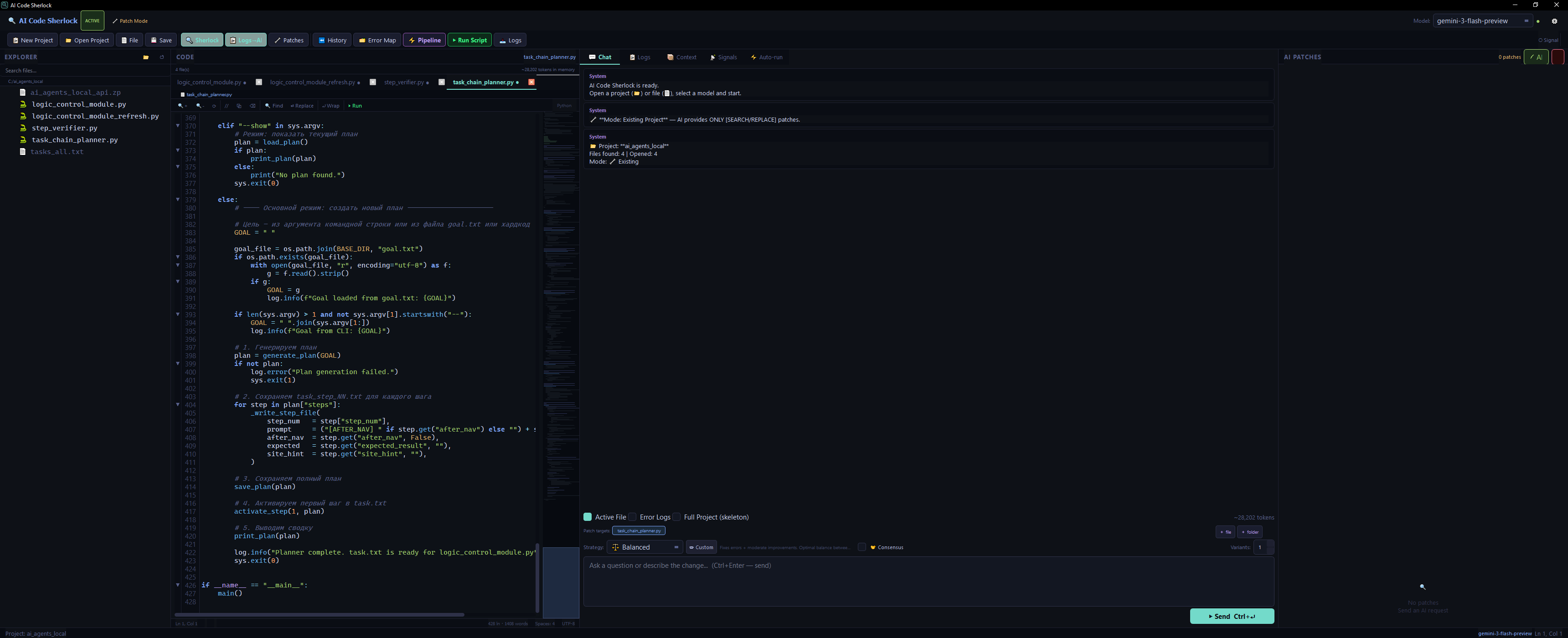
The Interface

Four-panel IDE.
Everything in view.

File explorer · Code editor with syntax highlighting · AI chat with streaming · Patch review panel — all in one window.

AI Code Sherlock v2.1 — data_universe.py — gemini-2.0-flash-preview
AI Code Sherlock interface — 4 panel layout with file tree, code editor, AI chat, and patch review
📁
File Explorer
Lazy-load tree with search, context menu, and file-to-AI send
✏️
Code Editor
Syntax highlight, line numbers, cursor tracking, multi-tab
💬
AI Chat
Streaming responses, save-as-file button, strategy selector
Patch Panel
Preview, apply, reject patches with one-click backup restore

Auto-Improve Pipeline

Set a goal. Press run.
Let Sherlock iterate.

The pipeline runs your scripts autonomously — observe, patch, validate, repeat — until the goal is reached or the iteration limit is hit.

▶️
Run Script
logs
📊
Extract Metrics
prompt
🧠
AI Strategy
patch
Apply + Validate
next iter
🎯
Goal Check / Stop
🛡️
Conservative
Only fix explicit errors. Minimal 1–3 line patches. Never touches working code without cause.
⚖️
Balanced
Fix errors + moderate improvements. Algorithmic tuning toward goal metrics. Default strategy.
🔥
Aggressive
Maximum improvements. Refactors logic, experiments with architecture. Multiple patches per iteration normal.
🧭
Explorer
Each iteration tries a principally different approach. Documents hypothesis being tested.
📈
Exploit
Doubles down on what already improved metrics. Intensifies successful patterns.
🔒
Safe Ratchet
Applies patch only if metrics improve. Auto-rolls back on regression. Monotonic progress.
🔬
Hypothesis
Forms explicit hypothesis → predicts outcome → patches → validates. Scientific approach.
🎭
Ensemble
Generates 3 patch variants (conservative / moderate / aggressive), selects most justified.

New Project Mode

Describe it.
Sherlock builds it.

No file open? No problem. Just describe what you want — AI generates the complete file with the correct extension, saves it, and opens it in the editor.

1
Create a new project
Click 📋 New Project, choose a folder, select "New Project" mode in the wizard.
2
Describe what to build
Type in the chat: "Create main.py — CSV parser script" or "Create app.js — Express REST API"
3
AI generates with empty SEARCH_BLOCK
The model outputs an empty SEARCH_BLOCK + full code in REPLACE_BLOCK. The engine detects this as a new-file creation pattern.
4
File saved automatically
Sherlock creates the file with the right extension, opens it in the editor, and adds it to the project tree. Ready to iterate.
💾
Save as File button
Every AI response now has a 💾 Save as File button — auto-detects language from markdown code fences and saves with the correct extension.
NEW PROJECT MODE — data_parser.py 🆕 NEW FILE
// User prompt:
"создай main.py — скрипт для парсинга CSV"
// AI response:
Создаю `main.py`:
[SEARCH_BLOCK]
(empty — new file)
[REPLACE_BLOCK]
import pandas as pd
import os
def parse_csv(path: str) -> pd.DataFrame:
"""Load and validate CSV file."""
if not os.path.exists(path):
raise FileNotFoundError(path)
return pd.read_csv(path)
[END_PATCH]
✅ File created → main.py
Opened in editor · Added to project tree

Patch System

See the difference.
Feel the precision.

The AI never rewrites your entire file. It identifies the exact block that needs changing and replaces only that — surgically.

BEFOREprocess_data.py
42def process_data(items):
43 total = 0
44 for item in items:
45 total += item["price"]
46 result = data[0]["value"]
47 return total
AFTER PATCHprocess_data.py
42def process_data(items):
43 total = 0
44 for item in items:
45 total += item["price"]
46 if not data:
47 return None
48 result = data[0]["value"]
49 return total
01
AI Generates Patch
The model outputs a structured [SEARCH_BLOCK] → [REPLACE_BLOCK] response targeting only the problematic lines.
02
Preview & Validate
Side-by-side diff dialog before anything is written. Exact-match algorithm — ambiguous patches are rejected outright.
03
Apply or Rollback
Syntax-check runs automatically after apply. Failed syntax triggers instant rollback to the last clean backup version.

Sherlock Mode

Elementary, dear developer.

Enable Sherlock Mode and let the AI act as a detective. It reads your error logs, traces the call stack, and pinpoints the root cause — not just the surface crash.

  • Error logs automatically collected from the log panel
  • Structured prompt with error trace, user hint, and relevant code context
  • AI identifies the exact line in the call chain that caused the fault
  • Minimal patch delivered — fixes the cause, not the symptom
  • Confidence score + reasoning chain always included
  • Pairs with Auto-Improve Pipeline for fully autonomous debugging loops
SHERLOCK ANALYSIS ENGINE 🔍 ACTIVE
// Error Logs
[ERROR] TypeError: 'NoneType' not subscriptable
at process_data() line 47
at main() line 12
// Hypothesis
data[0] called before empty-list guard.
Only fails on empty input — intermittent.
// Patch
[SEARCH_BLOCK]
result = data[0]["value"]
[REPLACE_BLOCK]
if not data: return None
result = data[0]["value"]
[END_PATCH]
CONFIDENCE
HIGH — 92% · Stack trace unambiguous

Consensus Engine

Many minds.
One best answer.

Query multiple AI models simultaneously and let them vote, compete, merge, or judge each other's responses. The strongest patch wins.

🗳️
Vote Mode
Patches agreed on by ≥ N models are accepted. Patches seen by only one model are discarded. Democratic consensus — minority opinions filtered out automatically.
🏆
Best-of-N
Pick the response with the most valid, non-overlapping patches in the shortest time. Simple, reliable, great for single-shot code generation tasks.
🔀
Merge Mode
Take all unique non-overlapping patches from all models and combine them. Each model contributes its best insight. Maximum coverage of the problem space.
⚖️
Judge Mode
A designated judge model reads all responses and selects the best one with a reasoned explanation. The most accurate mode — uses an extra AI call to evaluate quality.
// Supported model providers in consensus
🦙
Ollama
Local · Offline
🤖
OpenAI
GPT-4o, o1
Gemini
Flash, Pro
Groq
llama3.3-70b
🌊
Mistral
Codestral
🔗
Together AI
Mixtral, Llama
📁
File Signal
ZennoPoster IPC
🖥️
LM Studio
Any local model

Error Map

Project memory.
Never repeat a mistake.

Every error is indexed, deduplicated, and stored with its confirmed solution. Avoid-patterns prevent AI from trying approaches that already failed.

📐
Deduplication by Signature
Errors normalized — line numbers, memory addresses, timestamps stripped before SHA-256 hashing. Same bug in different runs tracked as one record with occurrence counter.
🔍
Fuzzy Similarity Search
New errors compared to historical records via keyword overlap scoring. Exact matches returned first; similar errors surfaced as prompt context automatically.
🚫
Avoid-Pattern Registry
When an AI suggestion makes things worse, record it. Future prompts include: "Do NOT try X — already failed." Prevents infinite loops of bad ideas.
💉
Auto Context Injection
Resolved errors with confirmed patches injected into AI context automatically. The model sees what actually fixed the same problem before — fewer hallucinations.
ERROR MAP — .sherlock_versions/error_map.json● 3 resolved · 1 open
error_id:a4f92e31
type:TypeError
status:resolved
seen:3x · last 2 min ago
root_cause:Empty list access line 47
solution:Guard before data[0]
occurrences:1

⚠ AVOID PATTERNS
✗ Wrap in try/except without fixing root cause
✓ Instead: guard empty list at call site

Universal Inputs

Feed it anything.
It reads everything.

The pipeline converts your script's output files into AI context — regardless of format.

📝
Text & Code
All source code and config formats read natively. Large files intelligently head+tail truncated.
.py.js.ts.go.rs.java.yaml.toml
📊
Data & Tables
Tabular data as pipe-separated previews (50 rows × 20 cols). Excel multi-sheet via openpyxl. Parquet via pandas.
.csv.xlsx.parquet.feather.tsv
🤖
ML Model Files
NumPy arrays report shape + stats. Pickle objects expose type and attributes. PyTorch state dicts list layers. HDF5 enumerates keys.
.npy.npz.pkl.pt.h5.joblib
📉
Smart Log Compression
Logs compressed while preserving 100% of errors and tracebacks. Progress bars deduped. Metrics sampled. 8000-char cap.
errors kepttracebacks keptmetrics sampled
🧹
Unicode Sanitizer
Zero-width spaces, BOM, soft hyphens, smart quotes, en/em dashes inside code blocks, mixed CRLF — all normalized automatically before patch extraction.
ZWSPBOMcurly quotesem-dash
Script Runner
Async subprocess with real-time stdout/stderr streaming. Auto-stdin sequences. Configurable timeout up to 999h. Env var injection.
.py.sh.bat.ps1auto-stdin

Privacy First

Your code stays yours.

Built local-first. Run entirely offline with Ollama — code, training data, and model weights never leave your machine.

🏠
100% Offline with Ollama
Pull any model locally — deepseek-coder-v2, codestral, llama3, mistral. Run ollama serve and Sherlock connects automatically. No API keys. No telemetry. No network calls required.
🔐
Atomic Settings with Recovery
Settings saved atomically via temp-file rename — corruption-proof. API keys stored in ~/.ai_code_sherlock/settings.json outside the project directory. Never committed to Git.
🗂️
File Signal IPC
ZennoPoster integration via plain text files on your local filesystem. No network sockets, no exposed ports. Sherlock writes request; your bot writes response.
🧱
Modular Provider System
Providers are clean ABC interfaces. Swap Ollama → OpenAI → File Signal without touching your workflow. Add a new provider by implementing a single abstract class.
// Architecture — Full Data Flow
💻
Your Code
Local Files
context
🗜️
Compressor
AST Skeleton
prompt
🧠
AI Model
Ollama / API
response
🧹
Filter
Unicode
patch
PatchEngine
Validate
save
Updated File
Versioned
Sponsored

Get Started

Up and running
in 60 seconds.

Three packages. One command. That's the entire setup.

bash — install & run
# 1. Clone the repo
$ git clone https://github.com/signupss/ai-code-sherlock.git
$ cd ai-code-sherlock

# 2. Install dependencies
$ pip install -r requirements.txt

# 3. Run AI Code Sherlock
$ python main.py

# Optional: local AI with Ollama
$ ollama serve && ollama pull deepseek-coder-v2

# Windows — double-click launcher
$ run.bat
Requirements
  • Python 3.11+
  • PyQt6 ≥ 6.6
  • aiohttp ≥ 3.9
  • aiofiles ≥ 23.2
Tested Models
  • deepseek-coder-v2
  • gemini-2.0-flash
  • gpt-4o, claude-3.5
  • codestral, llama3.3
Platforms
  • Windows 10/11
  • macOS 12+
  • Linux Ubuntu 20+
  • Any Python 3.11 env

Ready?

Start deducing.
Stop guessing.

Set a goal. Configure a pipeline. Let Sherlock iterate until your model converges, your tests pass, or your bug disappears.